
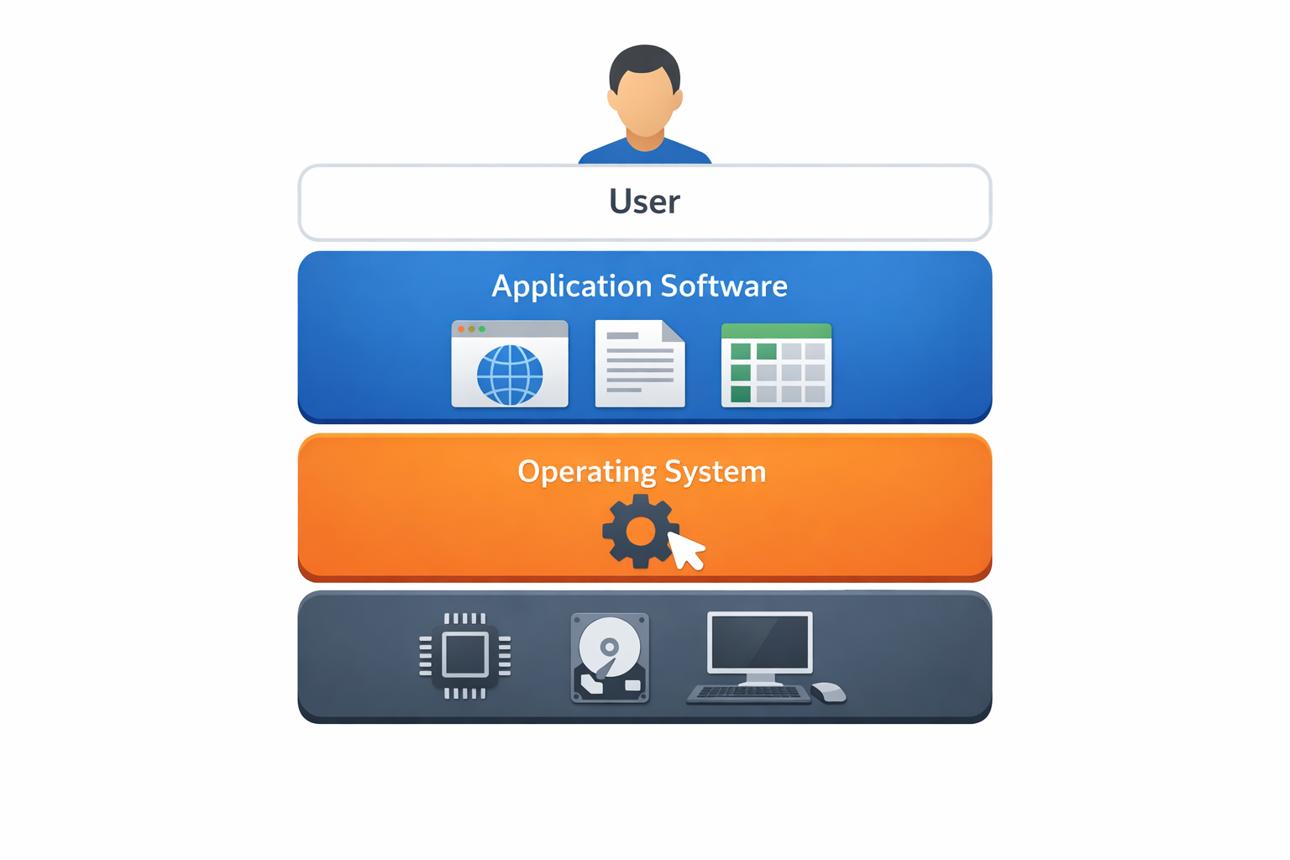
Windows, Linux, Ubuntu, and Parrot OS are examples of operating systems. You may already be using one of these operating systems on your computer. But have you ever wondered what an operating system actually is, what it contains, and how it helps you interact with your computer?
Let’s understand it in simple words.
What Is an Operating System?
An Operating System (OS) is system software that acts as an interface between the user, applications, and computer hardware.
Think about a situation where you want to communicate with a person who speaks a completely different language. You do not understand their language, and they do not understand yours. A translator can help both of you communicate.
In a similar way, an operating system helps you communicate with the computer.
When you click an application, save a file, play a video, connect a USB device, or perform another task, the operating system coordinates with the hardware and software needed to complete that task.
However, an OS is not simply a translator. It also manages important computer resources, such as the processor, memory, storage, files, and input/output devices.
What Is the Kernel?
You may have heard the term kernel while learning about operating systems. So, what exactly is it?
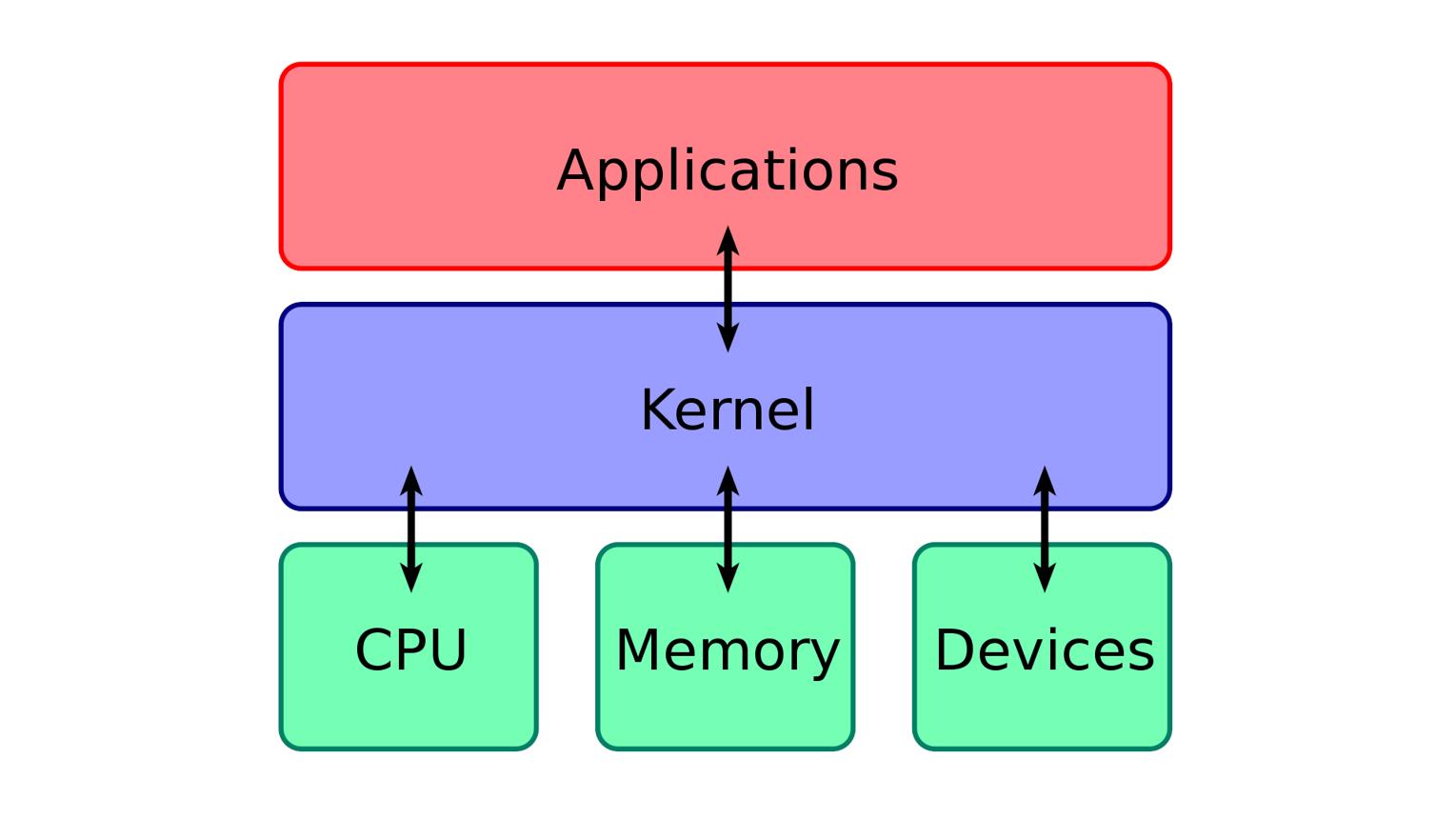
The kernel is the core part of an operating system. It manages communication between software and hardware and controls important resources such as CPU time, memory, and devices.
For example, when an application needs to read data from storage or use a hardware device, it cannot normally access the hardware directly. The operating system and its kernel provide the controlled mechanism for making that request.
Think of the kernel like a manager between applications and hardware.
The application makes a request, and the kernel manages how that request should be handled by the computer's hardware.
Two Important Modes in an Operating System
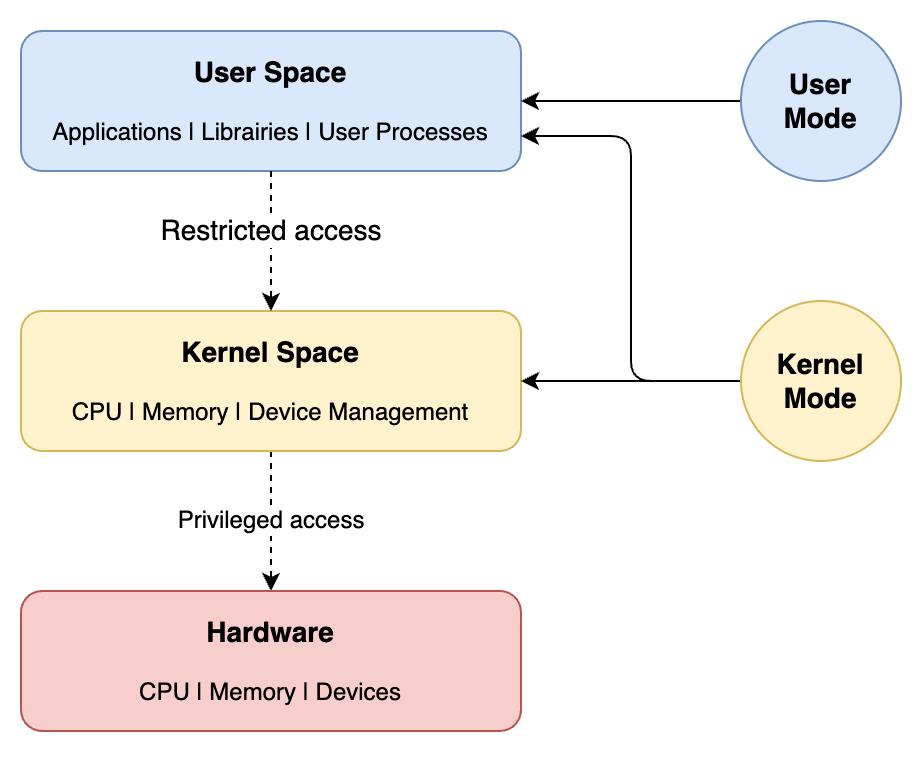
To protect the system and control access to hardware, modern operating systems commonly use two privilege levels:
1.User Mode
2.Kernel Mode
1. User Mode
Most applications run in user mode.
For example, your web browser, media player, text editor, and many other applications normally run with limited privileges.
This helps prevent one application from directly accessing or damaging important parts of the operating system.
2. Kernel Mode
The kernel runs in kernel mode, which has much higher privileges.
It can perform important operations such as managing memory, scheduling processes, and interacting with hardware through device drivers.
So, in simple terms:
User Mode → Applications and limited access
Kernel Mode → Core OS functions and privileged hardware access
These two modes are important for security, stability, and controlled access to computer resources.
What Is a System Call?
There is another important term you may hear when learning about operating systems: System Call.
A system call is a controlled way for a program running in user mode to request a service from the operating system kernel.
For example, an application may need to:
Open or read a file
Create a new process
Allocate memory
Communicate with another process
Access certain system resources
Instead of directly controlling the hardware, the application can make a system call and ask the operating system to perform the required operation.
Think of it like a formal request made by an employee to a manager. The employee does not directly access everything in the company; instead, they make a request through the proper process.
System calls are also important in cybersecurity because understanding how applications interact with the operating system helps security researchers and developers understand system behaviour and potential vulnerabilities.
Monolithic Kernel vs Microkernel
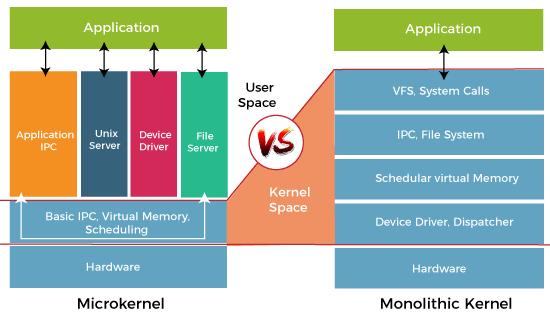
You may also come across two terms when studying operating-system design:
Monolithic Kernel
In a monolithic kernel, many operating-system services, such as device drivers, file-system support, networking, and memory management, operate within the kernel's privileged space.
This design can provide good performance because many components can communicate directly within the kernel.
However, because many components have high privileges, a serious problem in one kernel component can potentially affect the whole system.
Microkernel
A microkernel keeps only essential functions inside the kernel, such as basic process or thread management, communication mechanisms, and some memory-management functions.
Other services can run outside the kernel in user space.
The idea is to keep the privileged kernel smaller, which can improve isolation and make some parts of the system easier to manage.
A Simple Analogy
Let's understand the whole concept with a simple example.
Imagine a restaurant.
You = User
Application = Waiter taking your order
Operating System = Restaurant management
Kernel = Manager controlling important resources
Hardware = Kitchen, cooking equipment, tables, and other resources
System Call = A formal request to the manager
You do not normally go directly into the kitchen and operate the equipment yourself.
Instead, you give your request to the waiter. The request goes through the proper process, and the restaurant staff manages the resources needed to complete your order.
In a similar way, applications request services from the operating system, and the kernel manages access to important computer resources.
Final Thoughts
An operating system is much more than a simple interface or translator. It provides the environment in which applications run and manages important resources such as CPU, memory, storage, files, and hardware devices.
Understanding concepts such as user mode, kernel mode, system calls, and kernel architecture gives you a better idea of what happens behind the screen whenever you use a computer.
This is my understanding of an Operating System. If you found it useful, share your thoughts in the comments and let us know what technology topic you would like to explore next.